


DIGITAL SIGN DISPLAY
INSTALL INSTRUCTIONS
Use TV remote for the following:
- PLUG IN Sign Stick (shipped separately) into the HDMI 1 slot on the back of the Screen.
- Open TV and Wall Mount and hang on desired wall area.
- Turn Screen “ON” using (Screen Remote).
- PAIR your remote by connecting to your WIFI.
- Sign into our Amazon Account:
First name: Discount Last Name: Banners
Ph# 817-791-2184
Password: Aptscreens1!
- BYPASS & SKIP all options , then click on “DONE” (located in bottom right corner)
- Click on Discount Banners PROFILE.
- Click on INPUTS and select HDMI 1
Use SIGN STICK remote for the following:
Now we will connect the Sign Stick Remote to your WIFI:
- Click on SETTINGS button.

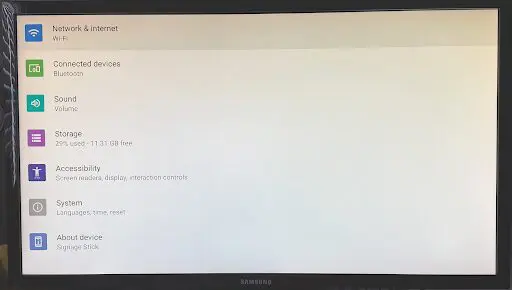
- Click on NETWORK & INTERNET.
- LOGIN to your Wifi.
- Click on CONNECT (located in bottom right corner)..
- Then click on HOME SCREEN once connected to Wifi.
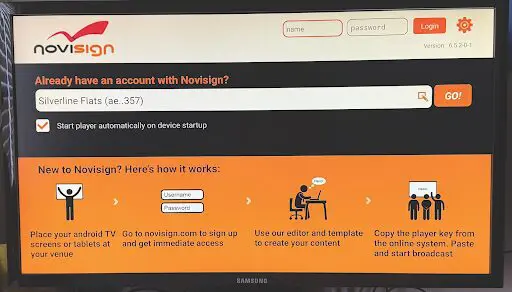
- You will see an orange and white screen…in white bar SELECT your PROPERTY NAME.
- Click “GO”.
Let the Slides Begin!!
Please contact us for trouble-shooting or remote set-up questions:
email: Laura@discountbannersandsigns.com or call (817) 791-2184.